
Download Fast Eulogy – AI‑Powered Personalized Eulogy Writer
Overview
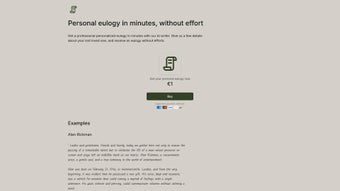
Fast Eulogy is a web‑based AI tool that transforms the often‑daunting task of writing a eulogy into a compassionate, quick, and stress‑free experience. By simply entering a handful of details about the loved one—such as their name, age, key life events, personality traits, and cherished memories—the platform’s deep‑learning engine crafts a heartfelt tribute that captures the essence of the individual. The service is built for anyone facing the emotional pressure of memorial speaking, from family members to close friends, and it delivers a professionally written narrative within minutes.
Its focus on respectful language, cultural sensitivity, and emotional nuance makes it a valuable ally during grief. While Fast Eulogy currently operates solely online and does not offer extensive offline editing capabilities, its speed, accuracy, and empathetic tone have earned it praise from users seeking a dignified way to honor a life. Whether you need a full‑length eulogy for a formal service or a concise homage for a virtual gathering, Fast Eulogy provides a secure, private, and free‑to‑try solution that emphasizes the human story behind the data you share.
Key Features
- Instant Generation: Produce a complete eulogy in under three minutes after submitting basic personal information.
- AI‑Driven Narrative: Utilizes advanced deep‑learning models trained on thousands of eulogies to ensure authentic tone and structure.
- Personalization Options: Choose between formal, conversational, or poetic styles, and specify religious or cultural references.
- Secure Data Handling: All submitted details are encrypted in transit and deleted after the eulogy is generated, respecting privacy.
- Cross‑Platform Access: Fully web‑based, works on any modern browser across Windows, macOS, Android, and iOS devices.
- Free Tier & Premium Upgrade: Core functionality is free; a premium plan adds unlimited revisions and custom formatting.
- Emotion‑Sensitive Language: Built‑in sentiment analysis adjusts wording to match the desired level of reverence and warmth.
- Export Options: Download the final eulogy as PDF, Word, or plain text for easy printing or sharing.
Installation & Usage Guide
Because Fast Eulogy is a cloud‑native service, there is no traditional installation process. Follow these steps to get started quickly:
Step‑by‑Step Instructions
- Access the Platform: Open your preferred web browser and navigate to fasteulogy.com. The site automatically detects your device and adjusts the layout for optimal readability.
- Create an Account (Optional): While you can generate a single eulogy without registration, creating a free account allows you to save drafts, revisit past tributes, and upgrade to premium features later.
- Enter Personal Details: Fill out the concise form with the deceased’s name, age, relationship to you, notable life events, hobbies, and any special anecdotes you wish to highlight. The interface provides helpful placeholders to guide you.
- Select a Tone: Choose from “Formal,” “Warm & Conversational,” or “Poetic” to match the setting of the memorial service. You can also toggle cultural or religious preferences if relevant.
- Generate the Eulogy: Click the “Create My Eulogy” button. The AI processes your inputs, referencing its extensive knowledge base, and returns a fully formatted tribute within 60–180 seconds.
- Review & Refine: Although the tool does not yet support in‑app editing, you can copy the generated text into any word processor to make minor tweaks. Premium users enjoy a “Revise” button for up to three AI‑assisted edits.
- Export & Share: Use the download icons to save the eulogy as a PDF, DOCX, or plain text file. You can then print it for the service, email it to co‑organizers, or upload it to a virtual memorial platform.
Overall, the user experience is designed to be as painless as possible during a time of grief. The platform’s responsive design ensures that the same workflow works on a desktop computer, a tablet, or a smartphone, allowing you to create a tribute wherever you feel most comfortable.
Compatibility, Performance, and Pros & Cons
Fast Eulogy runs entirely in the cloud, making it compatible with any operating system that supports a modern web browser—Windows 10/11, macOS Ventura and later, Linux distributions, Android 8+, and iOS 13+. Because the heavy lifting is performed on remote servers, users experience consistent performance regardless of device specifications. The platform leverages CDN acceleration to reduce latency, ensuring that the generation time remains under three minutes even on slower connections.
Pros
- Lightning‑fast generation saves time during emotionally charged moments.
- Highly personalized output thanks to deep‑learning language models.
- Free basic tier makes the service accessible to anyone in need.
- Secure, encrypted data handling respects user privacy.
- Cross‑platform compatibility eliminates the need for device‑specific installations.
- Export options simplify sharing and printing for memorial services.
Cons
- No offline mode; internet connection is required for every use.
- Limited in‑app editing; users must copy text to external editors for major revisions.
- Premium features (multiple revisions, custom formatting) are behind a paywall.
- Current version does not integrate directly with popular funeral‑planning software.
- AI may occasionally misinterpret nuanced cultural references without manual correction.
Frequently Asked Questions
Is Fast Eulogy free to use?
Yes, the core functionality—generating one personalized eulogy—is completely free. Users can sign up for a premium subscription to unlock unlimited revisions, custom formatting, and priority processing.
How does Fast Eulogy protect my personal information?
All data submitted through the form is encrypted using TLS 1.3 during transmission. The platform automatically deletes the personal details after the eulogy is generated, ensuring that no sensitive information is stored long‑term.
Can I choose the tone or style of the eulogy?
Absolutely. Fast Eulogy offers three primary styles—Formal, Warm & Conversational, and Poetic. Users can also select religious or cultural preferences to further tailor the language.
Do I need any special software to download the eulogy?
The generated eulogy can be exported as a PDF, Microsoft Word (.docx), or plain text file. Standard viewers—Adobe Reader, Microsoft Word, or any text editor—are sufficient to open these formats.
What if the AI misrepresents a detail about my loved one?
Because Fast Eulogy relies on the information you provide, double‑checking the input fields is essential. If the output contains errors, you can copy the text into a word processor and manually correct it, or premium users can request up to three AI‑assisted revisions.
Conclusion & Call to Action
When grief meets the pressure of public speaking, Fast Eulogy offers a compassionate bridge between memory and words. By leveraging cutting‑edge AI, the platform eliminates the writer’s block that often accompanies eulogy preparation, delivering a respectful, personalized tribute in minutes. While it lacks offline editing and some integration features, its speed, security, and free access make it a standout tool for anyone needing a heartfelt homage for a memorial service.
Ready to honor your loved one with a beautifully crafted eulogy? Start your free session now and experience the comfort of a thoughtfully written tribute—without the stress.
Fast Eulogy saved me from a sleepless night of trying to write a eulogy for my grandfather. The AI captured his humor and kindness perfectly, and the PDF export made it easy to print. I wish there were more in‑app editing tools, but the result was still a heartfelt tribute.
Pros: Speed, personalization, free tier.
Cons: No offline mode, limited editing.



.png)



